Best Affordable Communication Tools for Small NGOs in Nigeria
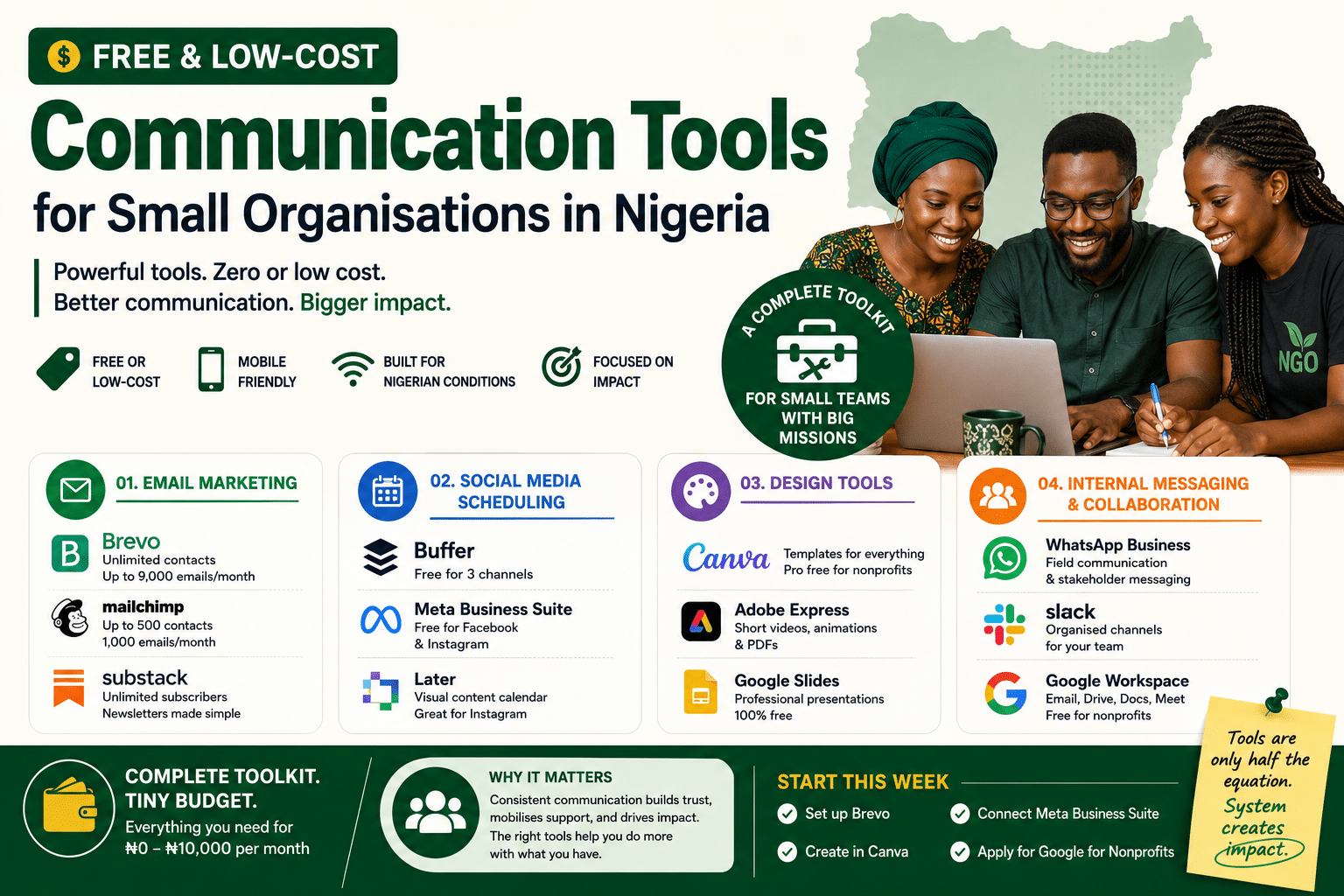
You do not need a big budget to communicate well. You need the right tools and a plan for using them consistently. Here is a practical guide to the best free and low-cost communications tools available to small NGOs, community organisations, and social enterprises in Nigeria right now.
Most small organisations in Nigeria run their entire communications function on one overworked staff member, a patchy internet connection, and a budget that barely covers data. That is not a reason to communicate poorly. It is a reason to be strategic about which tools you use and how you use them.
This guide covers four core areas: email marketing, social media scheduling, design tools, and internal messaging. For each, I have recommended the tools that work best in Nigerian conditions — meaning they are accessible on mobile, functional on slower connections, and either free or very low cost. At the end, I have included a starter budget table so you can see what a lean but functional communications toolkit would actually cost per month.
Email Marketing Platforms
Email remains one of the most cost-effective communication channels for organisations. A newsletter reaching your donors, partners, and community stakeholders costs almost nothing to send, and when done well, it does more for relationships than any social media post.
The challenge in Nigeria is choosing a platform that does not charge you in dollars for features you will not use. Here are the platforms that make the most sense for small organisations.
Brevo
Best for: Organisations with growing contact lists who send irregularly.
Brevo’s free plan gives you unlimited contacts and up to 300 emails per day — roughly 9,000 per month. For most small Nigerian NGOs sending a weekly or bi-weekly newsletter, this is more than enough. Unlike Mailchimp, Brevo does not charge you based on contact list size, which matters when your beneficiary or stakeholder list is large but your sending volume is modest.
It also includes SMS and WhatsApp marketing on paid plans — useful for organisations whose audiences are more reachable on mobile than by email.
Nigeria tip: Use Brevo’s drag-and-drop email builder with pre-designed blocks. You do not need a designer. Keep emails short — three sections maximum, because many recipients will read on mobile data.
Mailchimp
Best for: Organisations with under 500 contacts who want polished templates.
Mailchimp’s free plan covers up to 500 contacts and 1,000 emails per month. It is the most widely recognised email marketing platform globally and has the best template library at the free tier. If you are writing to a small but important list, major donors, board members, key partners, Mailchimp’s presentation quality is worth the contact limit.
Once your list grows beyond 500, costs increase quickly in naira terms. At that point, move to Brevo.
Nigeria tip: Use Mailchimp’s pre-built “nonprofit” templates. Customise the header with your logo and brand colours — it takes 20 minutes once and saves you every time you send.
Substack
Best for: Thought leaders, communications teams, or programme managers who want to publish a regular newsletter without managing a platform.
Substack is free to use for sending newsletters to unlimited subscribers. It charges a percentage only if you enable paid subscriptions, which most NGOs will not need. The benefit is that Substack handles everything: hosting, delivery, unsubscribes, and a simple archive. It is also a public platform, so new readers can find and subscribe to your newsletter without any advertising spend.
Nigeria tip: Use Substack for an external-facing “field notes” newsletter that shares programme updates, learning, and stories. It builds credibility with donors and partners who are not already in your network.
Social Media Scheduling Tools
Posting to social media manually — logging in, typing a caption, uploading an image, repeating for every platform — is a significant time drain for a small team. Scheduling tools let you batch-create content once a week and distribute it automatically.
In Nigerian NGO contexts, the platforms that matter most are Facebook (largest reach, especially in the North), Instagram (visual programmes, youth audiences), LinkedIn (donor and partner engagement), and increasingly X/Twitter for advocacy and public accountability work.
Buffer
Best for: Organisations managing Facebook, Instagram, and LinkedIn simultaneously.
Buffer’s free plan allows scheduling across three social media channels with up to 10 posts per channel in the queue at a time. For a small organisation posting three to four times per week, this is workable. The interface is clean and mobile-friendly, which matters when you are scheduling from a phone.
Paid plans start at around $6 per month, roughly ₦10,000 and unlock more channels, more queued posts, and basic analytics.
Nigeria tip: Use Buffer’s browser extension to quickly schedule articles, field photos, or links you come across during the day. Set a recurring weekly posting schedule (e.g. Monday, Wednesday, Friday) and fill the queue in one sitting each weekend.
Meta Business Suite
Best for: Organisations whose primary channels are Facebook and Instagram.
Meta Business Suite is Meta’s own free tool for managing Facebook and Instagram from one dashboard. You can schedule posts, respond to comments and messages, run basic ads, and view analytics — all for free. For organisations that do not need LinkedIn or X management, this is the most practical option because it has no contact limits, no plan tiers, and no cost at all.
It works well on mobile, which is important for teams in the field who need to post updates quickly.
Nigeria tip: Use the “Insights” tab in Meta Business Suite to find out when your specific audience is most active online. For many Nigerian NGO audiences, the peak engagement window is 7–9 PM on weekdays. Scheduling into that window significantly increases organic reach without spending on ads.
Later
Best for: Visually-driven organisations (health, education, environment) where Instagram is a priority platform.
Later’s free plan focuses heavily on Instagram and includes a visual content calendar where you can drag and drop posts into a grid preview. This is useful for organisations that need their Instagram feed to look coherent and branded. It also supports Facebook, X, and LinkedIn scheduling on paid tiers.
Nigeria tip: Use Later’s “Media Library” to store your branded templates and approved photos so that anyone on the team can schedule posts without hunting through WhatsApp groups for the right image.
“The organisations I have worked with that communicate most consistently are not the ones with the largest budgets. They are the ones with a simple system that anyone on the team can follow.”
Design Tools
You do not need a graphic designer on staff to produce professional-looking communications materials. The tools available today make it possible for a non-designer to produce donor reports, social media graphics, certificates, event flyers, and presentation decks that look polished and on-brand.
Canva
Best for: Everything. This is the one tool every small organisation in Nigeria should be using.
Canva provides templates for social media graphics, newsletters, reports, certificates, presentations, banners, and more, all in a drag-and-drop interface that requires no design experience. The free plan is genuinely comprehensive. The paid “Canva Pro” plan, which unlocks brand kits, background removal, and premium templates, is available free to registered nonprofits through Canva’s nonprofit programme.
If your organisation has a CAC registration and can provide documentation, apply for the nonprofit plan. It is worth the 30 minutes of paperwork.
Nigeria tip: Create a “Brand Kit” in Canva with your organisation’s colours, fonts, and logo. Then every member of the team, programme officers, field coordinators, communication volunteers — can produce on-brand content without needing approval for every graphic.
Adobe Express
Best for: Short-form video content, animated social posts, and quick PDF creation.
Adobe Express (formerly Adobe Spark) offers free access to a solid set of design tools including video editing for social media, animated graphics, and branded PDF creation. For organisations producing advocacy content or programme updates that need to move beyond static images, it is a strong free option. The mobile app works well on slower connections.
Nigeria tip: Use Adobe Express’s “short video” feature to turn field photos into 30-second Instagram Reels or Facebook Stories. A montage of programme photos with a caption and background music takes under 10 minutes to produce and consistently outperforms static posts in reach.
Google Slides
Best for: Donor presentations, partner briefings, and capacity-building sessions.
Google Slides is often underestimated as a design tool. With a good template (many are free on sites like Slidesgo), it produces professional presentations without requiring PowerPoint or a paid subscription. Crucially, it works in the browser and syncs across devices, so a programme officer can update a presentation in the field and the communications manager can present it from Abuja an hour later.
Nigeria tip: Store all presentation templates in a shared Google Drive folder. This eliminates the common situation where a donor meeting is delayed because “the file is on someone else’s laptop.”
Internal Team Messaging and Collaboration
Internal communications, how your team shares information, coordinates tasks, and documents decisions, is the foundation that everything else sits on. If your field team cannot quickly send a photo, a story, or a situation update to the communications function, no tool at headquarters will save you.
WhatsApp Business
Best for: Field-to-office communication, quick approvals, and stakeholder messaging in the Nigerian context.
Let us be honest: in Nigeria, most organisational communication already happens on WhatsApp. The question is whether you are using it with any structure. WhatsApp Business adds a layer of functionality, a business profile, quick replies for common messages, labels for contacts, and auto-replies, that makes it a more professional external-facing tool.
For internal use, WhatsApp group chats — when managed with clear protocols, work well for small organisations. The critical discipline is having separate groups for separate functions (field updates, programme team, communications) rather than one group for everything.
Nigeria tip: Create a “content capture” WhatsApp group where field staff send photos, quotes, and brief activity notes throughout the week. The communications function then pulls from this group to populate the content calendar. This system works even when field staff have no formal communications training.
Slack
Best for: Organisations with 5+ staff who need to separate conversations by project, programme, or function.
Slack’s free plan gives you unlimited messaging, up to 10 app integrations, and searchable message history for the last 90 days. For organisations that have grown beyond manageable WhatsApp groups, it provides a more structured environment. Channels can be organised by programme, donor, or communication type — making it much easier to find information later.
The downside is that Slack requires a reliable internet connection and is less natural for Nigerian staff who are accustomed to WhatsApp. It works best in organisations with a stable Abuja or Lagos-based team and should not be the primary channel for field communication.
Nigeria tip: If you use Slack, create a dedicated #content-requests channel where programme teams submit their communication needs with a simple format: What do you need? By when? Who is the audience? This prevents communication requests arriving as informal messages across five different platforms.
Google Workspace
Best for: Organisations that want Gmail, Google Drive, Docs, Sheets, and Meet under one branded domain — free.
Google for Nonprofits provides free access to Google Workspace — which would normally cost around $6 per user per month — to eligible nonprofits. This means you get professional email addresses (@yourorganisation.org), shared cloud storage, collaborative documents, and video calling, all at no cost. In the Nigerian NGO context, this is one of the highest-value free tools available.
Eligibility requires a registered nonprofit, validation through TechSoup, and a Google for Nonprofits application. The process takes two to four weeks but is worth it.
Nigeria tip: Once approved, use Google Drive as your central communications asset library — logos, approved photos, templates, past reports. A shared, organised Drive folder eliminates 80% of the “can you send me the file” messages that slow down communications work.
What a Lean Communications Toolkit Costs
If you combine the tools above strategically, here is what a fully functional communications toolkit costs a small Nigerian organisation per month:
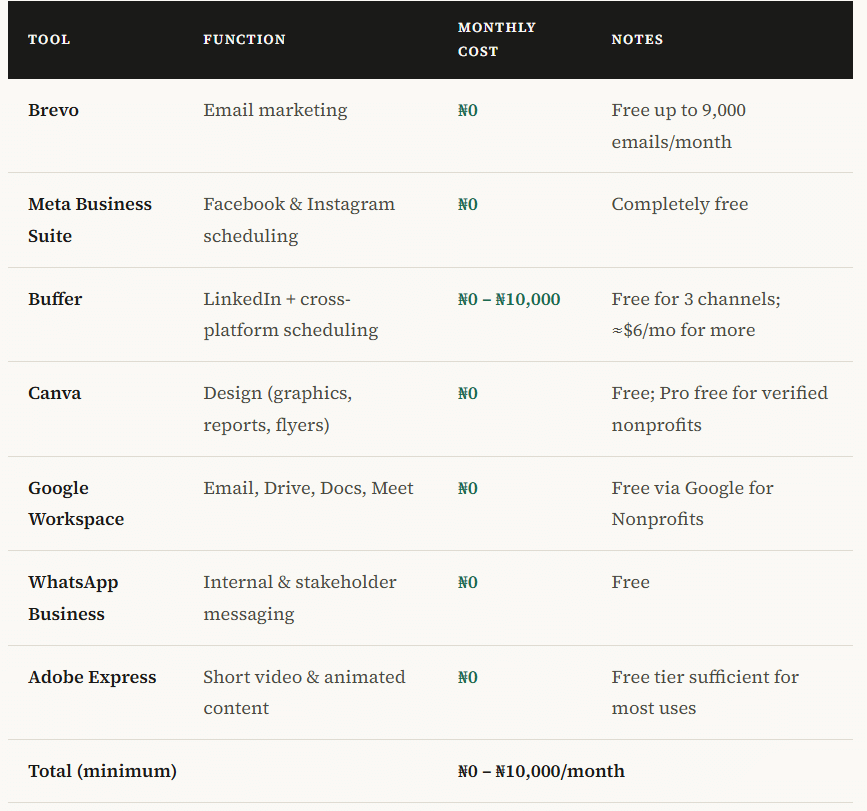
That is a full communications toolkit, email, design, scheduling, and collaboration, for between zero and ten thousand naira a month. The constraint is not the budget. It is knowing which tools to use, how to connect them, and how to build the workflows that make the system run without someone chasing it every week.
⚡ Quick start checklist this week
If you want to start today: (1) Set up a free Brevo account and import your contacts list. (2) Create a Canva free account and upload your logo and brand colours. (3) Connect your Facebook and Instagram pages to Meta Business Suite. (4) Apply for Google for Nonprofits if you have not already. That is your foundation. Everything else builds on it.
Tools Are Only Half the Equation
Here is something most tool lists do not tell you: the organisations that struggle most with communications are not struggling because they lack tools. They are struggling because the tools they have are not connected to a system, no content calendar, no clear ownership, no workflow that makes it obvious what needs to happen, who does it, and when.
A well-configured Brevo account helps only if someone is responsible for sending the newsletter. Canva templates help only if there is a process for getting photos and stories from the field into the hands of whoever is designing. A WhatsApp “content capture” group helps only if someone is reviewing it regularly and turning what comes in into publishable content.
The tools are free. The system is what takes time to build, and for most small organisations, that investment pays back quickly in reduced chaos, more consistent output, and communications that actually support the organisation’s goals rather than trailing behind them.
Working With a Communications Specialist
For many small organisations in Nigeria, the practical solution is to bring in a freelance communications specialist for a defined period — not to do the communications work permanently, but to build the system: set up the tools correctly, create the templates, write the workflow guides, and train whoever will be running things going forward.
That is the kind of support Asoh Nelson offers to small NGOs, community organisations, and development programmes. With over 15 years of communications experience across donor-funded projects and NGO contexts in Nigeria, he works with resource-constrained teams to build communications systems that are simple enough to run consistently — and strong enough to meet donor visibility and stakeholder engagement standards.
If your organisation has the tools but not yet the structure around them, that is a practical and fixable problem. Get in touch to discuss what a short-term engagement might look like.
Nelson Asoh has 15+ years of experience in NGO and INGO communications, working with programmes funded by UNICEF, the EU, USAID, IOM and the Dutch Embassy. Visit nelsonasoh.com.ng or take the free Communications Health Check.